After several months of being engaged on work related projects, I had again the opportunity to start updating my blog. For this particular post, i will be going through details on how did I setup my lab to access a device using Netmiko to extract any desired output.
Laboratory setup:
Below is my simple lab setup in EVE-NG. I am connecting to the switch through an Ubuntu server which is designated as a Cloud Network from the diagram below. The server is on the same network segment as my EVE-NG.

I will be using VSCode as my IDE. I will post another technical blog on how did I setup a connectivity from VSCode towards my Ubuntu dev machine.
High Level Steps:
- Configure the switch to provide SSH access from the dev machine.
- Validate the connectivity from the dev machine to the device.
- Run the Netmiko script to connect to the device
Below is the minimal required configurations to established the ssh access to the switch.
config t
hostname ccie-marathon-core-sw
int gi0/0
no switchport
ip address dhcp
no shut
ip domain-name cciemarathon.com
crypto key generate rsa general-keys modulus 2048
ip ssh version 2
username admin privilege 15 secret cciemarathon2022!
line vty 0 4
login local
transport input ssh
As confirmed below is configurations applied and the IP address assigned to the switch. The IP address allocated to Gi0/0 will be used to managed the device.
Switch#config t
Enter configuration commands, one per line. End with CNTL/Z.
Switch(config)#hostname ccie-marathon-core-sw
ccie-marathon-core-s(config)#int gi0/0
ccie-marathon-core-s(config-if)#no switchport
ccie-marathon-core-s(config-if)#ip dhcp address ^
ccie-marathon-core-s(config-if)#no shut
*May 9 20:42:14.640: %LINK-3-UPDOWN: Interface GigabitEthernet0/0, changed state to up
*May 9 20:42:15.643: %LINEPROTO-5-UPDOWN: Line protocol on Interface GigabitEthernet0/0, changed state to up
ccie-marathon-core-s(config-if)#
ccie-marathon-core-s(config-if)#ip domain-name cciemarathon.com
ccie-marathon-core-s(config)#
ccie-marathon-core-s(config)#$generate rsa general-keys modulus 2048
The name for the keys will be: ccie-marathon-core-sw.cciemarathon.com
% The key modulus size is 2048 bits
% Generating 2048 bit RSA keys, keys will be non-exportable…
[OK] (elapsed time was 0 seconds)
ccie-marathon-core-s(config)#ip ssh version 2
ccie-marathon-core-s(config)#
*May 9 20:41:41.652: %SSH-5-ENABLED: SSH 1.99 has been enabled
ccie-marathon-core-s(config)#
ccie-marathon-core-s(config)#line vty 0 4
ccie-marathon-core-s(config-line)#login local
ccie-marathon-core-s(config-line)#transport input ssh
ccie-marathon-core-s(config-line)#
ccie-marathon-core-s(config-line)#^Z
ccie-marathon-core-sw#
ccie-marathon-core-sw#
*May 9 20:42:39.575: %DHCP-6-ADDRESS_ASSIGN: Interface GigabitEthernet0/0 assigned DHCP address 192.168.0.146, mask 255.255.255.0, hostname ccie-marathon-core-sw
transport input ssh
*May 9 20:43:00.533: %SYS-5-CONFIG_I: Configured from console by consoleshow ip int br
ccie-marathon-core-sw#show ip int brief
Interface IP-Address OK? Method Status Protocol
GigabitEthernet0/0 192.168.0.146 YES DHCP up up
GigabitEthernet0/1 unassigned YES unset up up
GigabitEthernet0/2 unassigned YES unset up up
GigabitEthernet0/3 unassigned YES unset up up
GigabitEthernet1/0 unassigned YES unset up up
GigabitEthernet1/1 unassigned YES unset up up
GigabitEthernet1/2 unassigned YES unset up up
GigabitEthernet1/3 unassigned YES unset up up
Validating SSH access to the switch from the Dev Machine shows that SSH access is working from the Ubuntu host.

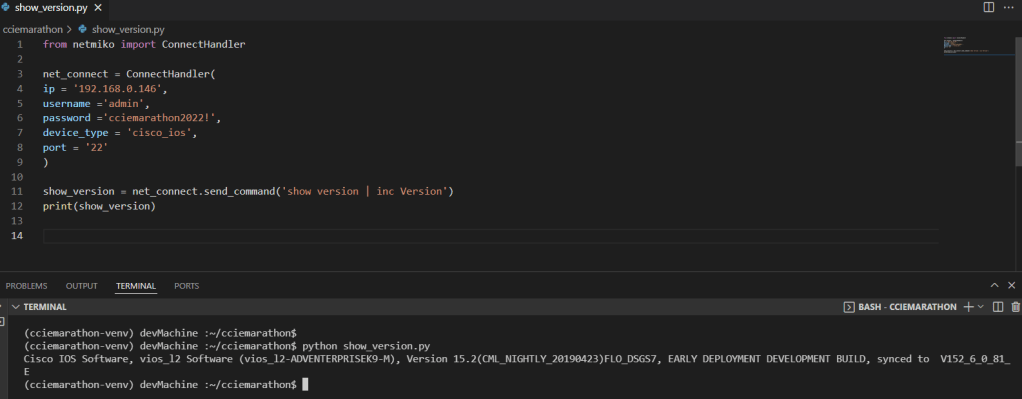
Netmiko Script to access the device is shown below,
#############END######################
 NETWORK LESSON
Leave a comment