In my previous post, I have explore how to set up a PPP links using PAP One-way authentications.
For a one-way PAP authentication, the server router is providing the authentication parameters and the client device will need to to match on the username and password that is setup on the server.
For two-way PAP authentication, each participating routers will be challenging each other with the configured usernames and password on each device.
For this LAB, I will be using the same topology as my previous PPP post.

NOTE: I had several occasions in which I have enabled PPP on the interface with my debug enabled as well and this creates some unwanted syslog messages.. I think, its better to shutdown the interface first before configuring PPP , etc.
Let me jump straight to the configurations:
R1#show run int s0/0
Building configuration…
Current configuration : 113 bytes
!
interface Serial0/0
ip address negotiated
encapsulation ppp
clock rate 2000000
ppp authentication pap
end
From the above configs, I will be shutting down Serial 0/0 and configure PPP PAP Authentication.
Step 1. Setting local authentication for R1:
R1(R1(config)#username ccnp password icandoit
Step 2. Enable PAP Authentication
R1(config-if)#ppp authentication ?
chap Challenge Handshake Authentication Protocol (CHAP)
eap Extensible Authentication Protocol (EAP)
ms-chap Microsoft Challenge Handshake Authentication Protocol (MS-CHAP)
ms-chap-v2 Microsoft CHAP Version 2 (MS-CHAP-V2)
pap Password Authentication Protocol (PAP)
R1(config-if)#ppp authentication pap
Step 3. Setup the remote PAP Challenge authentication parameters..
R1(config-if)# ppp pap ?
refuse Refuse to authenticate using PAP
sent-username Set outbound PAP username
wait Wait for caller to authenticate first
R1(config-if)# ppp pap sent-username ccie password go4it
That completes the configurations required in R1:

Let me jump into R2 configurations:


Now, let me enabled the interface in R1:
- There is an Incoming Configuration Request from R2 and LCP message have initiated to used PAP Authentication.

2. R1 have also sent out a Configuration Request to R2 and proposed to used PAP Authentication.

3. R1 send out a Configuration Acknowledgment with R2 :

4. And finally, R1 received a Configuration Acknowledgment from R2 and this completes the LCP Phase.

5. The Authentication Phase in which both routers R1/R2 have agreed on the PAP Authentication parameters.

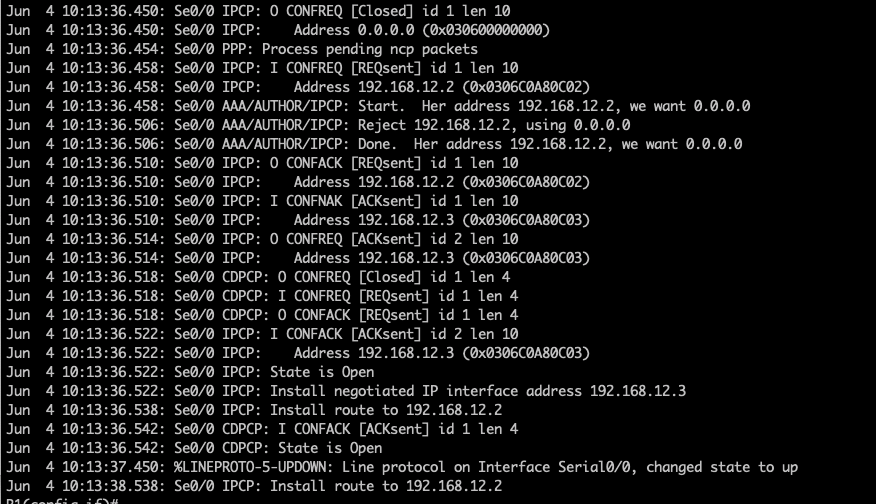
6. Finally R1 have been assigned with the IP address from the IP pool in R2.
###################### END OF LAB ##############################
 NETWORK LESSON
Leave a comment