This is another post about BGP focusing on Internal BGP. There are several important considerations with Internal BGP such as follows:
1. IBGP routers cannot advertise a routes coming from it’s direct peers to another IBGP routers.
This concept is known as IBGP Split Horizon.
2. All IBGP routers must have a BGP peering. This means that even if the routers are not connected, BGP neighbors must be set up for it to work…
3. In order to established BGP neighbors within IBGP, we can used OSPF or EIGRP. Best practice
is to used loopback interface..
The items which I have mentioned above are some of the important concepts to understand about Internal BGP.
Here is the topology for my laboratory,
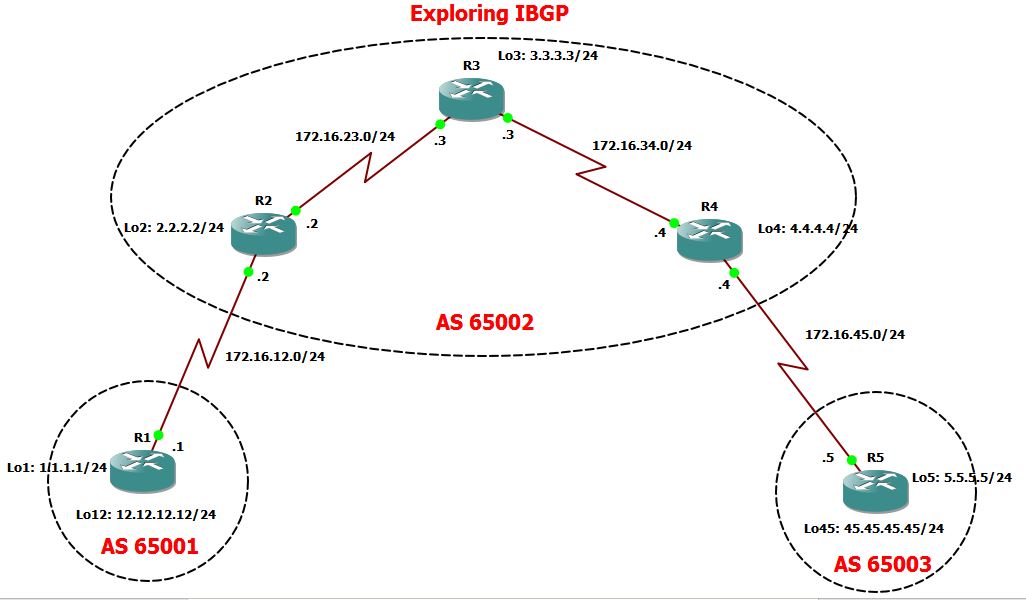
Laboratory Objective:
1. Setup EBGP between R1 and R2.
2. Configured IBGP on all routers within AS 65002. Used OSPF as the IGP..
3. Configure EBGP between R4 and R5
4. Test the connectivity between R1 Loopback 12 towards R5 Loopback 45.
Configuring the static routes on R1 & R2. This will ensure connections of the Loopback interfaces of both routers.
|
R1#sh run | sec ip route
ip route 2.2.2.2 255.255.255.255 172.16.12.2
R2#sh run | sec ip route
ip route 1.1.1.1 255.255.255.255 172.16.12.1
|
Let’s check if I can ping the Loopback interface:
|
R1#ping 2.2.2.2 source 1.1.1.1
Type escape sequence to abort.
Sending 5, 100-byte ICMP Echos to 2.2.2.2, timeout is 2 seconds:
Packet sent with a source address of 1.1.1.1
!!!!!
Success rate is 100 percent (5/5), round-trip min/avg/max = 52/60/76 ms
|
Let me established the EBGP between R1 and R2.
|
R1#sh run | sec bgp
ipv6 multicast rpf use-bgp
router bgp 65001
bgp log-neighbor-changes
network 12.12.12.0 mask 255.255.255.0
neighbor 2.2.2.2 remote-as 65002
neighbor 2.2.2.2 ebgp-multihop 2
neighbor 2.2.2.2 update-source Loopback1
R2#sh run | sec bgp
ipv6 multicast rpf use-bgp
router bgp 65002
bgp log-neighbor-changes
neighbor 1.1.1.1 remote-as 65001
neighbor 1.1.1.1 ebgp-multihop 2
neighbor 1.1.1.1 update-source Loopback2
|
So the EBGP neighbors between R1 and R2 were formed…
|
R1(config)#
*Oct 7 16:43:38.723: %BGP-5-ADJCHANGE: neighbor 2.2.2.2 Up
R2#
*Oct 7 16:43:35.823: %BGP-5-ADJCHANGE: neighbor 1.1.1.1 Up
|
As I advertise 12.12.12.0/24, it should be seen on R2 routing table.
|
R2#sh ip bgp
BGP table version is 3, local router ID is 2.2.2.2
Status codes: s suppressed, d damped, h history, * valid, > best, i – internal,
r RIB-failure, S Stale, m multipath, b backup-path, f RT-Filter,
x best-external, a additional-path, c RIB-compressed,
Origin codes: i – IGP, e – EGP, ? – incomplete
RPKI validation codes: V valid, I invalid, N Not found
Network Next Hop Metric LocPrf Weight Path
*> 12.12.12.0/24 1.1.1.1 0 0 65001 i
*> 172.16.12.0/24 0.0.0.0 0 32768 i
R2#show ip route bgp
!
Gateway of last resort is not set
12.0.0.0/24 is subnetted, 1 subnets
B 12.12.12.0 [20/0] via 1.1.1.1, 00:29:03
|
Let me set up the EBGP between R4 and R5.
|
R4#sh run | sec bgp
ipv6 multicast rpf use-bgp
router bgp 65002
bgp log-neighbor-changes
network 172.16.45.0 mask 255.255.255.0
neighbor 5.5.5.5 remote-as 65003
neighbor 5.5.5.5 ebgp-multihop 2
neighbor 5.5.5.5 update-source Loopback4
R5#sh run | sec bgp
ipv6 multicast rpf use-bgp
router bgp 65003
bgp log-neighbor-changes
network 45.45.45.0 mask 255.255.255.0
neighbor 4.4.4.4 remote-as 65002
neighbor 4.4.4.4 ebgp-multihop 2
neighbor 4.4.4.4 update-source Loopback5
|
EBGP neighbors were formed as shown below,
|
R4#
*Oct 7 16:58:42.039: %BGP-5-ADJCHANGE: neighbor 5.5.5.5 Up
R5#sh ip route 172.
*Oct 7 16:58:20.511: %BGP-5-ADJCHANGE: neighbor 4.4.4.4 Up
|
As I have advertised 45.45.45.0/24 on R5, it should be installed on R4 routing table. The BGP database also shows, it came from AS 65003.
|
R4#show ip bgp
BGP table version is 3, local router ID is 4.4.4.4
Status codes: s suppressed, d damped, h history, * valid, > best, i – internal,
r RIB-failure, S Stale, m multipath, b backup-path, f RT-Filter,
x best-external, a additional-path, c RIB-compressed,
Origin codes: i – IGP, e – EGP, ? – incomplete
RPKI validation codes: V valid, I invalid, N Not found
Network Next Hop Metric LocPrf Weight Path
*> 45.45.45.0/24 5.5.5.5 0 0 65003 i
*> 172.16.45.0/24 0.0.0.0 0 32768 i
R4#show ip route bgp
!
Gateway of last resort is not set
45.0.0.0/24 is subnetted, 1 subnets
B 45.45.45.0 [20/0] via 5.5.5.5, 00:02:16
|
Now, let me set up OSPF on Area 0 for R2, R3 and R4. Again, since I’m running IBGP, I need to have a full connectivity between IBGP routers which can only be done via IGP such as OSPF. I have advertise into OSPF the loopback interface of R2, R3 and R4 as this will be used as the source address for IBGP sessions.
|
R2#sh run | sec ospf
router ospf 1
network 2.2.2.2 0.0.0.0 area 0
network 172.16.23.0 0.0.0.255 area 0
R3#sh run | sec ospf
router ospf 1
network 172.16.23.0 0.0.0.255 area 0
network 172.16.34.0 0.0.0.255 area 0
R4#sh run | sec ospf
router ospf 1
network 4.4.4.4 0.0.0.0 area 0
network 172.16.34.0 0.0.0.255 area 0
|
Now, Let me check the OSPF neighbors.
|
R2#sho ip ospf neighbor
Neighbor ID Pri State Dead Time Address Interface
3.3.3.3 0 FULL/ – 00:00:32 172.16.23.3 Serial2/1
R3#show ip ospf neighbor
Neighbor ID Pri State Dead Time Address Interface
4.4.4.4 0 FULL/ – 00:00:29 172.16.34.4 Serial2/2
2.2.2.2 0 FULL/ – 00:00:29 172.16.23.2 Serial2/1
R4#show ip ospf neighbor
Neighbor ID Pri State Dead Time Address Interface
3.3.3.3 0 FULL/ – 00:00:39 172.16.34.3 Serial2/2
|
Alright, seems everything on the IGP network is working fine. let me test the connectivity to
ensure I have no issue later on…
|
So I can ping R4 loopback from R2..
R2#ping 4.4.4.4 source 2.2.2.2
Type escape sequence to abort.
Sending 5, 100-byte ICMP Echos to 4.4.4.4, timeout is 2 seconds:
Packet sent with a source address of 2.2.2.2
!!!!!
Success rate is 100 percent (5/5), round-trip min/avg/max = 76/80/84 ms
But I cannot ping R3 loopback from R2…
R2#ping 3.3.3.3 source 2.2.2.2
Type escape sequence to abort.
Sending 5, 100-byte ICMP Echos to 3.3.3.3, timeout is 2 seconds:
Packet sent with a source address of 2.2.2.2
…..
Success rate is 0 percent (0
But look at the comparison here. I don’t have the routes for 3.3.3.3/24 on R2.
R2#sh ip route 3.3.3.3
% Network not in table
R2#sh ip route 4.4.4.4
Routing entry for 4.4.4.4/32
Known via “ospf 1”, distance 110, metric 129, type intra area
Last update from 172.16.23.3 on Serial2/1, 00:04:05 ago
Routing Descriptor Blocks:
* 172.16.23.3, from 4.4.4.4, 00:04:05 ago, via Serial2/1
Route metric is 129, traffic share count is 1
Did some troubleshooting and it’s just a configs mistake, I forgot to advertise 3.3.3.3 into OSPF in R3.
R3#sh run | sec ospf
router ospf 1
network 172.16.23.0 0.0.0.255 area 0
network 172.16.34.0 0.0.0.255 area 0
R3#config t
Enter configuration commands, one per line. End with CNTL/Z.
R3(config)#router ospf 1
R3(config-router)#network 3.3.3.3 0.0.0.0 area 0
R3(config-router)#
By this time, I should be able to see the routes from both R2 and R4…
R2#sh ip route 3.3.3.3
Routing entry for 3.3.3.3/32
Known via “ospf 1”, distance 110, metric 65, type intra area
Last update from 172.16.23.3 on Serial2/1, 00:00:58 ago
Routing Descriptor Blocks:
* 172.16.23.3, from 3.3.3.3, 00:00:58 ago, via Serial2/1
Route metric is 65, traffic share count is 1
Let me try to ping now R3 from R2…
R2#ping 3.3.3.3 source 2.2.2.2
Type escape sequence to abort.
Sending 5, 100-byte ICMP Echos to 3.3.3.3, timeout is 2 seconds:
Packet sent with a source address of 2.2.2.2
!!!!!
Success rate is 100 percent (5/5), round-trip min/avg/max = 52/69/132 ms
|
Alright, it’s time for the IBGP Configurations
|
R2:
R2#sh run | sec bgp
ipv6 multicast rpf use-bgp
router bgp 65002
bgp log-neighbor-changes
network 172.16.12.0 mask 255.255.255.0
neighbor 1.1.1.1 remote-as 65001
neighbor 1.1.1.1 ebgp-multihop 2
neighbor 1.1.1.1 update-source Loopback2
neighbor 3.3.3.3 remote-as 65002
neighbor 3.3.3.3 update-source Loopback2
neighbor 4.4.4.4 remote-as 65002
neighbor 4.4.4.4 update-source Loopback2 neighbor 4.4.4.4 next-hop-self
R3:
R3#sh run | sec bgp
ipv6 multicast rpf use-bgp
router bgp 65002
bgp log-neighbor-changes
neighbor 2.2.2.2 remote-as 65002
neighbor 2.2.2.2 update-source Loopback3
neighbor 4.4.4.4 remote-as 65002
neighbor 4.4.4.4 update-source Loopback3
R4:
R4#sh run | sec bgp
ipv6 multicast rpf use-bgp
router bgp 65002
bgp log-neighbor-changes
network 172.16.45.0 mask 255.255.255.0
neighbor 2.2.2.2 remote-as 65002
neighbor 2.2.2.2 update-source Loopback4
neighbor 2.2.2.2 next-hop-self
neighbor 3.3.3.3 remote-as 65002
neighbor 3.3.3.3 update-source Loopback4
neighbor 5.5.5.5 remote-as 65003
neighbor 5.5.5.5 ebgp-multihop 2
neighbor 5.5.5.5 update-source Loopback4
|
|
* The UPDATE SOURCE command is used to tell the neighbor of the source of the BGP TCP Packet..
* The EBGP-Multihop is to increased the TTL value as we have used the loopback as the source of the
BGP packets.(Updates)…This will only used in External BGP.
* The new command NEXT-HOP -SELF which is set up in R2 and R4 is required to tell the neighbor that in order to reach a prefix outside of the AS, you have to used that router as the next hop..
|
Alright, lets check the IBGP neighbors…So it tells me below that the IBGP neighbors were
formed…
|
R2#sh ip bgp summary
BGP router identifier 2.2.2.2, local AS number 65002
BGP table version is 5, main routing table version 5
4 network entries using 576 bytes of memory
4 path entries using 320 bytes of memory
4/4 BGP path/bestpath attribute entries using 544 bytes of memory
2 BGP AS-PATH entries using 48 bytes of memory
0 BGP route-map cache entries using 0 bytes of memory
0 BGP filter-list cache entries using 0 bytes of memory
BGP using 1488 total bytes of memory
BGP activity 4/0 prefixes, 4/0 paths, scan interval 60 secs
Neighbor V AS MsgRcvd MsgSent TblVer InQ OutQ Up/Down State/PfxRcd
1.1.1.1 4 65001 62 65 5 0 0 00:53:16 1
3.3.3.3 4 65002 15 15 5 0 0 00:08:43 0
4.4.4.4 4 65002 22 22 5 0 0 00:14:52 2
R3#sh ip bgp summary
BGP router identifier 3.3.3.3, local AS number 65002
BGP table version is 3, main routing table version 3
4 network entries using 576 bytes of memory
4 path entries using 320 bytes of memory
3/1 BGP path/bestpath attribute entries using 408 bytes of memory
2 BGP AS-PATH entries using 48 bytes of memory
0 BGP route-map cache entries using 0 bytes of memory
0 BGP filter-list cache entries using 0 bytes of memory
BGP using 1352 total bytes of memory
BGP activity 4/0 prefixes, 4/0 paths, scan interval 60 secs
Neighbor V AS MsgRcvd MsgSent TblVer InQ OutQ Up/Down State/PfxRcd
2.2.2.2 4 65002 15 15 3 0 0 00:08:52 2
4.4.4.4 4 65002 15 14 3 0 0 00:08:54 2
R3#
R4#sh ip bgp summary
BGP router identifier 4.4.4.4, local AS number 65002
BGP table version is 5, main routing table version 5
4 network entries using 576 bytes of memory
4 path entries using 320 bytes of memory
4/4 BGP path/bestpath attribute entries using 544 bytes of memory
2 BGP AS-PATH entries using 48 bytes of memory
0 BGP route-map cache entries using 0 bytes of memory
0 BGP filter-list cache entries using 0 bytes of memory
BGP using 1488 total bytes of memory
BGP activity 4/0 prefixes, 4/0 paths, scan interval 60 secs
Neighbor V AS MsgRcvd MsgSent TblVer InQ OutQ Up/Down State/PfxRcd
2.2.2.2 4 65002 23 22 5 0 0 00:15:13 2
3.3.3.3 4 65002 14 15 5 0 0 00:09:04 0
5.5.5.5 4 65003 45 49 5 0 0 00:38:28 1
R4#
|
Now, let me go straight and check the connectivity between R1 and R5 loopback…Looking at the
BGP database and Routing Table in R1, I have the following entries…But let me try to ping from
R1…
|
R1#sh ip bgp
BGP table version is 5, local router ID is 12.12.12.12
Status codes: s suppressed, d damped, h history, * valid, > best, i – internal,
r RIB-failure, S Stale, m multipath, b backup-path, f RT-Filter,
x best-external, a additional-path, c RIB-compressed,
Origin codes: i – IGP, e – EGP, ? – incomplete
RPKI validation codes: V valid, I invalid, N Not found
Network Next Hop Metric LocPrf Weight Path
*> 12.12.12.0/24 0.0.0.0 0 32768 i
*> 45.45.45.0/24 2.2.2.2 0 65002 65003 i
r> 172.16.12.0/24 2.2.2.2 0 0 65002 i
*> 172.16.45.0/24 2.2.2.2 0 65002 i
R1#show ip route bgp
!
Gateway of last resort is not set
45.0.0.0/24 is subnetted, 1 subnets
B 45.45.45.0 [20/0] via 2.2.2.2, 00:16:54
172.16.0.0/16 is variably subnetted, 3 subnets, 2 masks
B 172.16.45.0/24 [20/0] via 2.2.2.2, 00:16:54
R1#ping 45.45.45.45
Type escape sequence to abort.
Sending 5, 100-byte ICMP Echos to 45.45.45.45, timeout is 2 seconds:
UUUUU
Success rate is 0 percent (0/5
|
So let’s check each hop… Looking at R2..It learned about 45.45.45.45 via IGP…meaning this
was advertise as a network under BGP and is from AS 65003..
|
R2#show ip bgp
BGP table version is 5, local router ID is 2.2.2.2
Status codes: s suppressed, d damped, h history, * valid, > best, i – internal,
r RIB-failure, S Stale, m multipath, b backup-path, f RT-Filter,
x best-external, a additional-path, c RIB-compressed,
Origin codes: i – IGP, e – EGP, ? – incomplete
RPKI validation codes: V valid, I invalid, N Not found
Network Next Hop Metric LocPrf Weight Path
*> 12.12.12.0/24 1.1.1.1 0 0 65001 i
*>i 45.45.45.0/24 4.4.4.4 0 100 0 65003 i
*> 172.16.12.0/24 0.0.0.0 0 32768 i
*>i 172.16.45.0/24 4.4.4.4 0 100 0 i
So it means R2 is picking up the routes..but when I do my traceroutes, it drops at R3…
R2#traceroute 45.45.45.45
Type escape sequence to abort.
Tracing the route to 45.45.45.45
VRF info: (vrf in name/id, vrf out name/id)
1 172.16.23.3 60 msec 52 msec 56 msec
2 172.16.23.3 !H !H !H
So let’s check R3….So with the BGP database for R3, it just tells me that 45.45.45.45 is an IGP routes
which is advertise as a network into BGP..seems okay but R3 does not have it it’s BGP routing table…
R3#sh ip bgp
BGP table version is 3, local router ID is 3.3.3.3
Status codes: s suppressed, d damped, h history, * valid, > best, i – internal,
r RIB-failure, S Stale, m multipath, b backup-path, f RT-Filter,
x best-external, a additional-path, c RIB-compressed,
Origin codes: i – IGP, e – EGP, ? – incomplete
RPKI validation codes: V valid, I invalid, N Not found
Network Next Hop Metric LocPrf Weight Path
* i 12.12.12.0/24 1.1.1.1 0 100 0 65001 i
* i 45.45.45.0/24 5.5.5.5 0 100 0 65003 i
*>i 172.16.12.0/24 2.2.2.2 0 100 0 i
*>i 172.16.45.0/24 4.4.4.4 0 100 0 i
R3#
R3#show ip route bgp
!
Gateway of last resort is not set
172.16.0.0/16 is variably subnetted, 6 subnets, 2 masks
B 172.16.12.0/24 [200/0] via 2.2.2.2, 00:17:15
B 172.16.45.0/24 [200/0] via 4.4.4.4, 00:17:17
R3#
There’e actually two issues here…
1. The Next hop address is via 5.5.5.5 which is R5 loopback address…But does R3 knows how to reach
5.5.5.5? I guess NO… Let see…
R3#show ip route 5.5.5.5
% Network not in table <<<<<< So it’s not in its routing table…
R3#
How can we fixed this????? let me answer this later on…What i wanted to do is to look at R4…So here is R4 BGP database….
R4#sho ip bgp
BGP table version is 5, local router ID is 4.4.4.4
Status codes: s suppressed, d damped, h history, * valid, > best, i – internal,
r RIB-failure, S Stale, m multipath, b backup-path, f RT-Filter,
x best-external, a additional-path, c RIB-compressed,
Origin codes: i – IGP, e – EGP, ? – incomplete
RPKI validation codes: V valid, I invalid, N Not found
Network Next Hop Metric LocPrf Weight Path
*>i 12.12.12.0/24 2.2.2.2 0 100 0 65001 i
*> 45.45.45.0/24 5.5.5.5 0 0 65003 i
*>i 172.16.12.0/24 2.2.2.2 0 100 0 i
*> 172.16.45.0/24 0.0.0.0 0 32768 i
So R4 can install this on its routing table as it’s a valid best route…( with the symbol *>)…
R4#show ip route bgp
!
Gateway of last resort is not set
12.0.0.0/24 is subnetted, 1 subnets
B 12.12.12.0 [200/0] via 2.2.2.2, 00:27:42
45.0.0.0/24 is subnetted, 1 subnets
B 45.45.45.0 [20/0] via 5.5.5.5, 00:35:22
172.16.0.0/16 is variably subnetted, 6 subnets, 2 masks
B 172.16.12.0/24 [200/0] via 2.2.2.2, 00:27:42
But why R3 is not installing the same routes …I think the answer is because, R3 doesn’t know about 5.5.5.5…Right?????
So the only options is to let R3 knows the next hop address of all routes that he learned from R4 should be R4 and not R5….So NEXT-HOP-SELF will be used to solved this issue…
R4#sh run | sec bgp
ipv6 multicast rpf use-bgp
router bgp 65002
bgp log-neighbor-changes
network 172.16.45.0 mask 255.255.255.0
neighbor 2.2.2.2 remote-as 65002
neighbor 2.2.2.2 update-source Loopback4
neighbor 2.2.2.2 next-hop-self
neighbor 3.3.3.3 remote-as 65002
neighbor 3.3.3.3 update-source Loopback4
neighbor 5.5.5.5 remote-as 65003
neighbor 5.5.5.5 ebgp-multihop 2
neighbor 5.5.5.5 update-source Loopback4
R4#
R4#
R4#config t
Enter configuration commands, one per line. End with CNTL/Z.
R4(config)#router bgp 65002
R4(config-router)#neighbor 3.3.3.3 next-hop-self
I need to clear BGP so it will have a new routes….I will do this in R3…
R3#clear ip bgp *
R3#
*Oct 7 17:53:05.983: %BGP-5-ADJCHANGE: neighbor 2.2.2.2 Down User reset
*Oct 7 17:53:05.983: %BGP_SESSION-5-ADJCHANGE: neighbor 2.2.2.2 IPv4 Unicast topology base removed from session User reset
*Oct 7 17:53:05.991: %BGP-5-ADJCHANGE: neighbor 4.4.4.4 Down User reset
*Oct 7 17:53:05.991: %BGP_SESSION-5-ADJCHANGE: neighbor 4.4.4.4 IPv4 Unicast topology base removed from session User reset
*Oct 7 17:53:06.531: %BGP-5-ADJCHANGE: neighbor 4.4.4.4 Up
*Oct 7 17:53:06.799: %BGP-5-ADJCHANGE: neighbor 2.2.2.2 Up
And now here’s comes the new NEXT HOP address which is 4.4.4.4 (R3) for the network 45.45.45.45/24.
R3#sh ip bgp
BGP table version is 1, local router ID is 3.3.3.3
Status codes: s suppressed, d damped, h history, * valid, > best, i – internal,
r RIB-failure, S Stale, m multipath, b backup-path, f RT-Filter,
x best-external, a additional-path, c RIB-compressed,
Origin codes: i – IGP, e – EGP, ? – incomplete
RPKI validation codes: V valid, I invalid, N Not found
Network Next Hop Metric LocPrf Weight Path
* i 12.12.12.0/24 1.1.1.1 0 100 0 65001 i
* i 45.45.45.0/24 4.4.4.4 0 100 0 65003 i
* i 172.16.12.0/24 2.2.2.2 0 100 0 i
* i 172.16.45.0/24 4.4.4.4 0 100 0 i
Traceroutes is still dropping at R4…
R3#traceroute 45.45.45.45
Type escape sequence to abort.
Tracing the route to 45.45.45.45
VRF info: (vrf in name/id, vrf out name/id)
1 172.16.34.4 56 msec 56 msec 52 msec
2 * * *
The reverse traceroutes towards R1 from R5 also drops at R3..
R5#traceroute 12.12.12.12
Type escape sequence to abort.
Tracing the route to 12.12.12.12
VRF info: (vrf in name/id, vrf out name/id)
1 172.16.45.4 [AS 65002] 56 msec 56 msec 52 msec
2 172.16.34.3 56 msec 52 msec 84 msec
3 172.16.34.3 !H !H !H
I think, I have missed one configs on R2 which is the NEXT-HOP-SELF to R3… R2 must tell his neighbor R3 that in order to reach 12.12.12.12.0/24 network, it has to go through him (R2)…
R2(config-router)#neighbor 3.3.3.3 next-hop-se
R2(config-router)#neighbor 3.3.3.3 next-hop-self
R2(config-router)#
Now, after few seconds, I was able to have full connectivity between R1 and R5…
R5#ping 12.12.12.12 source 45.45.45.45
Type escape sequence to abort.
Sending 5, 100-byte ICMP Echos to 12.12.12.12, timeout is 2 seconds:
Packet sent with a source address of 45.45.45.45
!!!!!
Success rate is 100 percent (5/5), round-trip min/avg/max = 104/108/116 ms
R5#
So here’s R5 BGP database…
R5#show ip bgp
BGP table version is 5, local router ID is 45.45.45.45
Status codes: s suppressed, d damped, h history, * valid, > best, i – internal,
r RIB-failure, S Stale, m multipath, b backup-path, f RT-Filter,
x best-external, a additional-path, c RIB-compressed,
Origin codes: i – IGP, e – EGP, ? – incomplete
RPKI validation codes: V valid, I invalid, N Not found
Network Next Hop Metric LocPrf Weight Path
*> 12.12.12.0/24 4.4.4.4 0 65002 65001 i
*> 45.45.45.0/24 0.0.0.0 0 32768 i
*> 172.16.12.0/24 4.4.4.4 0 65002 i
r> 172.16.45.0/24 4.4.4.4 0 0 65002 i
Here’s R1 BGP database…
R1#sho ip bgp
BGP table version is 5, local router ID is 12.12.12.12
Status codes: s suppressed, d damped, h history, * valid, > best, i – internal,
r RIB-failure, S Stale, m multipath, b backup-path, f RT-Filter,
x best-external, a additional-path, c RIB-compressed,
Origin codes: i – IGP, e – EGP, ? – incomplete
RPKI validation codes: V valid, I invalid, N Not found
Network Next Hop Metric LocPrf Weight Path
*> 12.12.12.0/24 0.0.0.0 0 32768 i
*> 45.45.45.0/24 2.2.2.2 0 65002 65003 i
r> 172.16.12.0/24 2.2.2.2 0 0 65002 i
*> 172.16.45.0/24 2.2.2.2 0 65002 i
Here’s R2 BGP database,
R2#show ip bgp
BGP table version is 5, local router ID is 2.2.2.2
Status codes: s suppressed, d damped, h history, * valid, > best, i – internal,
r RIB-failure, S Stale, m multipath, b backup-path, f RT-Filter,
x best-external, a additional-path, c RIB-compressed,
Origin codes: i – IGP, e – EGP, ? – incomplete
RPKI validation codes: V valid, I invalid, N Not found
Network Next Hop Metric LocPrf Weight Path
*> 12.12.12.0/24 1.1.1.1 0 0 65001 i
*>i 45.45.45.0/24 4.4.4.4 0 100 0 65003 i
*> 172.16.12.0/24 0.0.0.0 0 32768 i
*>i 172.16.45.0/24 4.4.4.4 0 100 0 i
R2#
Here’s R3 BGP database..
R3#show ip bgp
BGP table version is 5, local router ID is 3.3.3.3
Status codes: s suppressed, d damped, h history, * valid, > best, i – internal,
r RIB-failure, S Stale, m multipath, b backup-path, f RT-Filter,
x best-external, a additional-path, c RIB-compressed,
Origin codes: i – IGP, e – EGP, ? – incomplete
RPKI validation codes: V valid, I invalid, N Not found
Network Next Hop Metric LocPrf Weight Path
*>i 12.12.12.0/24 2.2.2.2 0 100 0 65001 i
*>i 45.45.45.0/24 4.4.4.4 0 100 0 65003 i
*>i 172.16.12.0/24 2.2.2.2 0 100 0 i
*>i 172.16.45.0/24 4.4.4.4 0 100 0 i
R3#
Here’s R4 BGP Database.
R4#show ip bgp
BGP table version is 5, local router ID is 4.4.4.4
Status codes: s suppressed, d damped, h history, * valid, > best, i – internal,
r RIB-failure, S Stale, m multipath, b backup-path, f RT-Filter,
x best-external, a additional-path, c RIB-compressed,
Origin codes: i – IGP, e – EGP, ? – incomplete
RPKI validation codes: V valid, I invalid, N Not found
Network Next Hop Metric LocPrf Weight Path
*>i 12.12.12.0/24 2.2.2.2 0 100 0 65001 i
*> 45.45.45.0/24 5.5.5.5 0 0 65003 i
*>i 172.16.12.0/24 2.2.2.2 0 100 0 i
*> 172.16.45.0/24 0.0.0.0 0 32768 i
R4#
|
Here are my final working BGP configs:
|
R1#sh run | sec bgp
ipv6 multicast rpf use-bgp
router bgp 65001
bgp log-neighbor-changes
network 12.12.12.0 mask 255.255.255.0
neighbor 2.2.2.2 remote-as 65002
neighbor 2.2.2.2 ebgp-multihop 2
neighbor 2.2.2.2 update-source Loopback1
R2#sh run | sec bgp
ipv6 multicast rpf use-bgp
router bgp 65002
bgp log-neighbor-changes
network 172.16.12.0 mask 255.255.255.0
neighbor 1.1.1.1 remote-as 65001
neighbor 1.1.1.1 ebgp-multihop 2
neighbor 1.1.1.1 update-source Loopback2
neighbor 3.3.3.3 remote-as 65002
neighbor 3.3.3.3 update-source Loopback2
neighbor 3.3.3.3 next-hop-self
neighbor 4.4.4.4 remote-as 65002
neighbor 4.4.4.4 next-hop-self
neighbor 4.4.4.4 update-source Loopback 2 R3#sh run | sec bgp
ipv6 multicast rpf use-bgp
router bgp 65002
bgp log-neighbor-changes
neighbor 2.2.2.2 remote-as 65002
neighbor 2.2.2.2 update-source Loopback3
neighbor 4.4.4.4 remote-as 65002
neighbor 4.4.4.4 update-source Loopback3
R3#
R4#sh run | sec bgp
ipv6 multicast rpf use-bgp
router bgp 65002
bgp log-neighbor-changes
network 172.16.45.0 mask 255.255.255.0
neighbor 2.2.2.2 remote-as 65002
neighbor 2.2.2.2 update-source Loopback4
neighbor 2.2.2.2 next-hop-self
neighbor 3.3.3.3 remote-as 65002
neighbor 3.3.3.3 update-source Loopback4
neighbor 3.3.3.3 next-hop-self
neighbor 5.5.5.5 remote-as 65003
neighbor 5.5.5.5 ebgp-multihop 2
neighbor 5.5.5.5 update-source Loopback4
R4#
R5#sh run | sec bgp
ipv6 multicast rpf use-bgp
router bgp 65003
bgp log-neighbor-changes
network 45.45.45.0 mask 255.255.255.0
neighbor 4.4.4.4 remote-as 65002
neighbor 4.4.4.4 ebgp-multihop 2
neighbor 4.4.4.4 update-source Loopback5
R5#
|
Finally, this ends my laboratory…. BGP is quite interesting to learned…….
*********************************END OF LAB************************************
 NETWORK LESSON
Leave a comment