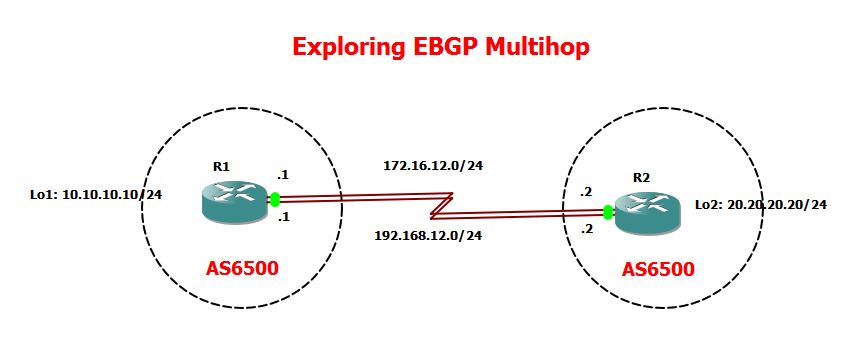
On this study notes, I’m going through a scenario on EBGP-MULTIHOP. My topology consist of two Routers that are connected via two serial connections. I will be establishing EBGP peering between this two routers using the Loopback interface.
Here is my topology for this laboratory,

Goal for this lab:
1. Established BGP peering using loopback interface
2. Increased the TTL value of both R1 and R2 to ensure that BGP source for TCP connections are using the loopback interface.
3. Set up the serials links and ensure that both are utilized.
Here are my router configurations:
|
R1:
R1#sh run | sec bgp
ipv6 multicast rpf use-bgp
router bgp 65000
bgp log-neighbor-changes
neighbor 20.20.20.20 remote-as 65001
neighbor 20.20.20.20 ebgp-multihop 2
neighbor 20.20.20.20 update-source Loopback1
|
|
R2:
R2#sh run | sec bgp
ipv6 multicast rpf use-bgp
router bgp 65001
bgp log-neighbor-changes
neighbor 10.10.10.10 remote-as 65000
neighbor 10.10.10.10 ebgp-multihop 2
neighbor 10.10.10.10 update-source Loopback2
|
|
Okay, two of the most important command for this scenario is the EBGP-MULTIHOP command and the “UPDATE-SOURCE” command.
EBGP-MULTIHOP is only implemented to formed EBGP neighbors and it is used to increased the TTL value. As routers will decreased the TTL value by default to 1, increasing it to TTL of 2 will ensure that the loopback interface which is used as the source for the BGP updates is reachable.
UPDATE-SOURCE command is used to tell to the peer which is the source of the BGP Packets ( Open, Update, Keepalive, and Notification).
|
A static route is required to ensure that the loopback is reachable from both ends..In this scenario, I have two interface connecting both routers so I have to used two static routes. Note that it is not required to be a static routes since the main objective is to provide connectivity to the Loopback interface from both sides for the reason mentioned above.
|
R1#sh run | inc ip route
ip route 20.20.20.0 255.255.255.0 172.16.12.2
ip route 20.20.20.0 255.255.255.0 192.168.12.2
R2#sh run | inc ip route
ip route 10.10.10.0 255.255.255.0 172.16.12.1
ip route 10.10.10.0 255.255.255.0 192.168.12.1
Checking the routing table:
R1#sh ip route
!
Gateway of last resort is not set
10.0.0.0/8 is variably subnetted, 2 subnets, 2 masks
C 10.10.10.0/24 is directly connected, Loopback1
L 10.10.10.10/32 is directly connected, Loopback1
20.0.0.0/24 is subnetted, 1 subnets
S 20.20.20.0 [1/0] via 192.168.12.2
[1/0] via 172.16.12.2
R2#show ip route
!
Gateway of last resort is not set
10.0.0.0/24 is subnetted, 1 subnets
S 10.10.10.0 [1/0] via 192.168.12.1
[1/0] via 172.16.12.1
|
|
R1#sh ip bgp summary
BGP router identifier 10.10.10.10, local AS number 65000
BGP table version is 1, main routing table version 1
Neighbor V AS MsgRcvd MsgSent TblVer InQ OutQ Up/Down State/PfxRcd
20.20.20.20 4 65001 6 6 1 0 0 00:02:45 0
R2#show ip bgp summary
BGP router identifier 20.20.20.20, local AS number 65001
BGP table version is 1, main routing table version 1
Neighbor V AS MsgRcvd MsgSent TblVer InQ OutQ Up/Down State/PfxRcd
10.10.10.10 4 65000 7 7 1 0 0 00:02:55 0
|
Checking the BGP database and as expected, there’s no BGP database yet as I did not advertise
anything yet.
|
R1#show ip bgp
R1#
R2#sh ip bgp
R2#
Let me create a Loopback 10 on R1 with the network 100.100.100.100/24 network and advertise it to BGP.
R1(config)#int lo10
R1(config-if)#ip address 100.100.100.100 255.255.255.0
R1(config)#router bgp 65000
R1(config-router)#network 100.100.100.0 mask 255.255.255.0
R1(config-router)#^Z
Now, checking the BGP database on R1:
R1#show ip bgp
BGP table version is 2, local router ID is 10.10.10.10
Status codes: s suppressed, d damped, h history, * valid, > best, i – internal,
r RIB-failure, S Stale, m multipath, b backup-path, f RT-Filter,
x best-external, a additional-path, c RIB-compressed,
Origin codes: i – IGP, e – EGP, ? – incomplete
RPKI validation codes: V valid, I invalid, N Not found
Network Next Hop Metric LocPrf Weight Path
*> 100.100.100.0/24 0.0.0.0 0 32768 i
R1#
Let’s check whether this is propagated in R2.
R2#show ip bgp
BGP table version is 2, local router ID is 20.20.20.20
Status codes: s suppressed, d damped, h history, * valid, > best, i – internal,
r RIB-failure, S Stale, m multipath, b backup-path, f RT-Filter,
x best-external, a additional-path, c RIB-compressed,
Origin codes: i – IGP, e – EGP, ? – incomplete
RPKI validation codes: V valid, I invalid, N Not found
Network Next Hop Metric LocPrf Weight Path
*> 100.100.100.0/24 10.10.10.10 0 0 65000 i
R2#
So it shows that 100.100.100.100/24 is reachable via 10.10.10.10 with the AS of 65000. As this the best valid routes, it will be installed on R2 Routing table.
R2#show ip route bgp
Codes: L – local, C – connected, S – static, R – RIP, M – mobile, B – BGP
D – EIGRP, EX – EIGRP external, O – OSPF, IA – OSPF inter area
N1 – OSPF NSSA external type 1, N2 – OSPF NSSA external type 2
E1 – OSPF external type 1, E2 – OSPF external type 2
i – IS-IS, su – IS-IS summary, L1 – IS-IS level-1, L2 – IS-IS level-2
ia – IS-IS inter area, * – candidate default, U – per-user static route
o – ODR, P – periodic downloaded static route, H – NHRP, l – LISP
+ – replicated route, % – next hop override
Gateway of last resort is not set
100.0.0.0/24 is subnetted, 1 subnets
B 100.100.100.0 [20/0] via 10.10.10.10, 00:03:55
R2#
|
 NETWORK LESSON
Leave a comment