
Note: Auto-MDIX (automatic medium-dependent interface crossover) detects the wrong cable and causes the switch to swap the pair it uses for transmitting and receiving, which solves the cabling problem.
Autonegotiations, Speed and Duplex:
· Cisco switches use a default duplex setting of half duplex (HDX) (for 10-Mbps and 100-Mbps interfaces) or full duplex (FDX) (for 1000-Mbps interfaces.
· To disable autonegotiation on a Cisco switch port, you simply need to statically configure the speed and the duplex settings.
Carrier Sense Multiple Access with Collision Detection (CSMA/CD)
· When two or more Ethernet frames overlap on the transmission medium at the same instant in time, a collision occurs; the collision results in bit errors and lost frames.
Steps in the CSMA/CD process:
1. A device with a frame to send listens until the Ethernet is not busy (in other words, the device cannot sense a carrier signal on the Ethernet segment).
2. When the Ethernet is not busy, the sender begins sending the frame.
3. The sender listens to make sure that no collision occurred.
4. If there was a collision, all stations that sent a frame send a jamming signal to ensure that all stations recognize the collision.
5. After the jamming is complete, each sender of one of the original collided frames randomizes a timer and waits that long before resending. (Other stations that did not create the collision do not have to wait to send.)
6. After all timers expire, the original senders can begin again with Step 1.
ETHERNET HEADER FIELDS
Ethernet addresses also frequently called MAC addresses, are 6 bytes in length, typically listed in hexadecimal form.
Types of Ethernet Addresses
· Unicast Fancy term for an address that represents a single LAN interface. The I/G bit, the least significant bit in the most significant byte, is set to 0.
· Broadcast A n address that means “all devices that reside on this LAN right now.” Always a value of hex FFFFFFFFFFFF.
· Multicast A MAC address that implies some subset of all devices currently on the LAN. By definition, the I/G bit is set to 1.
· If the sender wants to send the frame to every device on the LAN, it sends the frame to the FFFF.FFFF.FFFF broadcast destination address.
· Frames sent to unicast MAC addresses are called unicasts or unicast frames
· Multicast Ethernet frames are used to communicate with a possibly dynamic subset of the devices on a LAN.
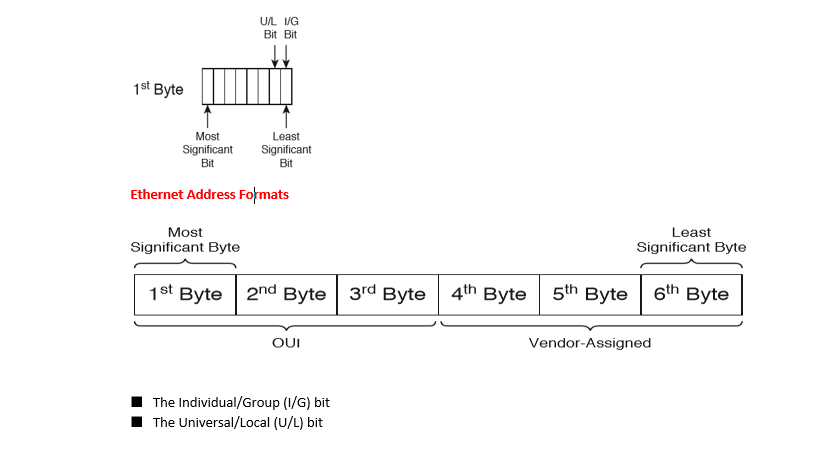
I /G Binary 0 means that the address is a unicast; Binary 1 means that the address is a multicast or broadcast.
U/L Binary 0 means that the address is vendor assigned; Binary 1 means that the address has been administratively assigned, overriding the vendor-
assigned address.
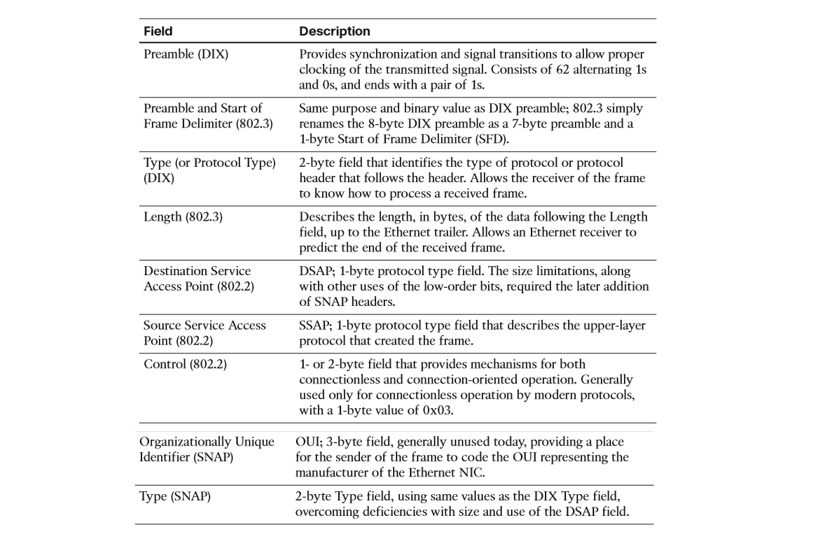
Protocol Types and the 802.3 Length Field
· Type Field identifies the format of the Data field in the frame.
· These fields allow the receiver of an Ethernet frame to know how to interpret the data in the received frame.
Ethernet Type Fields
· Protocol Type – DIX V2 Type field; 2 bytes; registered values now administered by the IEEE
· DSAP – 802.2 LLC; 1 byte, with 2 high-order bits reserved for other purposes; registered values now administered by the IEEE
· SNAP – SNAP header; 2 bytes; uses same values as Ethernet Protocol Type; signified by an 802.2 DSAP of 0xAA
 NETWORK LESSON
Leave a comment