Host 1 (eth 2/21) – 192.168.100.21 – communicates only with Host 2 and its default gateway
Host 2 (eth 2/22) – 192.168.100.22 – Communicates only with Host 1 and its default gateway
Host 3 (eth 2/23) – 192.168.100.23 – Communicates only with Host 4 and its default gateway
Host 4 (eth 2/24) – 192.168.100.24 – communicates only with Host 3 and its default gateway
host 5 (eth 2/25) – 192.168.100.25 – sends traffic only to its default gateway
host 6 (eth 2/26) – 192.168.100.26 – sends traffic only to its default gateway
Private VLAN Types and Conditions:
1. Primary: Communicates with all other ports in the primary VLAN and both on isolated and community VLAN ports
2. Secondary:
a. Isolated VLAN – can communicate only with the promiscous ports in primary VLAN. cannot
received broadcast at all.
b. Community VLAN – can communicate with other ports in the same community vlan, restricted
to communicate with other community vlan, can communicate with
promiscuous ports belonging to the primary vlan.
Deployment:
Primary VLAN 100 – SVI 192.168.100.1
Host 1 & Host 2 – Community 1 VLAN 102
Host 3 & Host 4 – Community 2 VLAN 103
Host 5 – Isolated VLAN 101
Host 6 – Isolated VLAN 101
Topology:
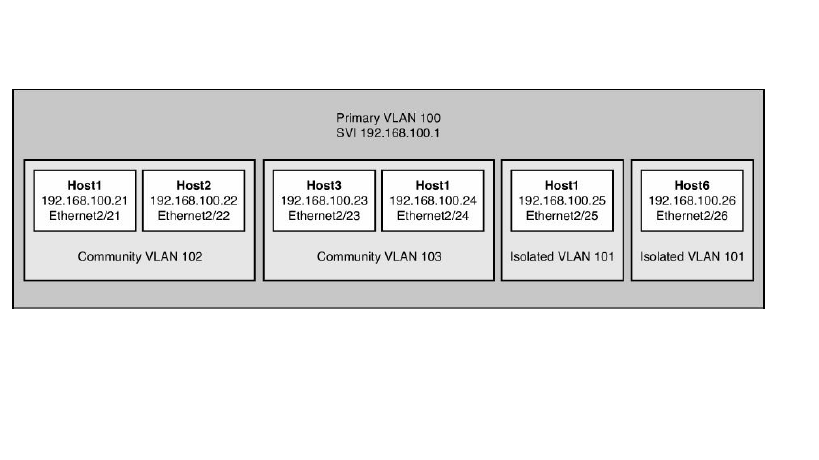
CONFIGURATIONS:
Step 1. Enable private-vlan features
N7K-1(config)# feature private-vlan
Step 2. Create the private-VLAN’s
N7K-1(config)# vlan 101
N7K-1(config-vlan)# name VLAN101-ISOLATED
N7K-1(config-vlan)# private-vlan ?
association Configure association between private VLANs
community Configure the VLAN as community private VLAN
isolated Configure the VLAN as isolated private VLAN
primary Configure the VLAN as primary private VLAN
N7K-1(config-vlan)# private-vlan isolated
N7K-1(config-vlan)# exit
N7K-1(config)# vlan 102
N7K-1(config-vlan)# name VLAN102-COMMUNITY1
N7K-1(config-vlan)# private-vlan community
N7K-1(config-vlan)# exit
N7K-1(config)# vlan 103
N7K-1(config-vlan)# name VLAN103-COMMUNITY2
N7K-1(config-vlan)# private-vlan community
N7K-1(config-vlan)# exit
N7K-1(config)# vlan 100
N7K-1(config-vlan)# name VLAN100-PRIMARY
N7K-1(config-vlan)# private-vlan primary
N7K-1(config-vlan)# private-vlan association add 101-103
N7K-1(config-vlan)# exit
N7K-1(config)#
Step 3. Create the SVI for the primary VLAN
N7K-1(config)# int vlan 100
N7K-1(config-if)# ip address 192.168.100.1/24
N7K-1(config-if)# private-vlan mapping add 101-103
N7K-1(config-if)# no shut
N7K-1(config-if)# exit
Step 4. Assign private vlan to interface
N7K-1(config)# int ethernet 2/21
N7K-1(config-if)# description HOST1
N7K-1(config-if)# switchport mode private-vlan ?
host Port mode pvlan host
promiscuous Port mode pvlan promiscuous
trunk Private-vlan trunk promiscuous
N7K-1(config-if)# switchport mode private-vlan host
N7K-1(config-if)# switchport private-vlan host-association 100 102
N7K-1(config-if)# exit
N7K-1(config)#
N7K-1(config)# int ethernet 2/22
N7K-1(config-if)# description HOST2
N7K-1(config-if)# switchport mode private-vlan host
N7K-1(config-if)# switchport private-vlan host-association 100 102
N7K-1(config-if)# exit
N7K-1(config)# int ethernet 2/23
N7K-1(config-if)# description HOST3
N7K-1(config-if)# switchport
N7K-1(config-if)# switchport mode private-vlan host
N7K-1(config-if)# switchport private-vlan host-association 100 103
N7K-1(config-if)# exit
N7K-1(config)# int eth 2/24
N7K-1(config-if)# description HOST4
N7K-1(config-if)# switchport
N7K-1(config-if)# switchport mode private-vlan host
N7K-1(config-if)# switchport private-vlan host-association 100 103
N7K-1(config-if)# exit
N7K-1(config)# int ethernet 2/25
N7K-1(config-if)# switchport
N7K-1(config-if)# description HOST5
N7K-1(config-if)# switchport mode private-vlan host
N7K-1(config-if)# switchport mode private-vlan host
N7K-1(config-if)# switchport private-vlan host-association 100 101
N7K-1(config-if)#exit
N7K-1(config)# int ethernet 2/26
N7K-1(config-if)# switchport
N7K-1(config-if)# description HOST6
N7K-1(config-if)# switchport mode private-vlan host
N7K-1(config-if)# switchport mode private-vlan host
N7K-1(config-if)# switchport private-vlan host-association 100 101
N7K-1(config-if)#exit
Verification Command:
show interface private-vlan mapping
show vlan private-vlan
Disclaimer: Simulated on Nexus Titanium emulator using NX-OS and Cisco Switching Next-Generation Data Center Architecture book. I am not claiming original work, but was only created for my quick reference.
 NETWORK LESSON
Leave a comment